Wide-Angle Dashcam Coverage Explained for Android Drivers
Wide-Angle Dashcam Coverage Explained for Android Drivers
Wide-angle dashcam coverage refers to the field of view your camera captures, measured in degrees, and for smartphone dashcam apps like DriveSight it typically spans 140°–170° diagonally. That range lets your phone record two to three lanes of traffic, nearby sidewalks, and side-impact zones that a narrow lens would miss entirely.
Three things to know right now:
- A diagonal FOV around 140°–150° is often considered a practical sweet spot for most Android setups: wide enough for adjacent lanes, sharp enough to read plates.
- Wide-angle recording paired with parking mode catches hit-and-run approach vectors that a 90°–120° lens simply cannot see.
- Chasing the biggest FOV number backfires. Beyond 160°, edge distortion and pixel spread start costing you the readable detail that actually matters in a claim.
Table of Contents
- What “wide-angle dashcam coverage” means technically
- Real-world benefits a wider FOV actually delivers
- Why wider isn’t always better: clarity vs. coverage
- How to choose the right FOV and settings for your Android setup
- How mounting position changes your effective coverage
- How to verify your dashcam’s coverage actually works
- How speed-camera and police-alert apps make wide-angle recording more effective
- Key Takeaways
- The angle most drivers get wrong
- DriveSight: wide-angle recording plus proactive alerts in one Android app
- Useful sources
- FAQ
What “wide-angle dashcam coverage” means technically
Field of view is measured in degrees across three axes: horizontal (side to side), vertical (top to bottom), and diagonal (corner to corner). Manufacturers almost always advertise the diagonal figure because it is the largest of the three, so a “150° dashcam” might deliver a horizontal FOV closer to 120°. Knowing that distinction saves you from buying a lens that looks impressive on a spec sheet but underdelivers on the road.
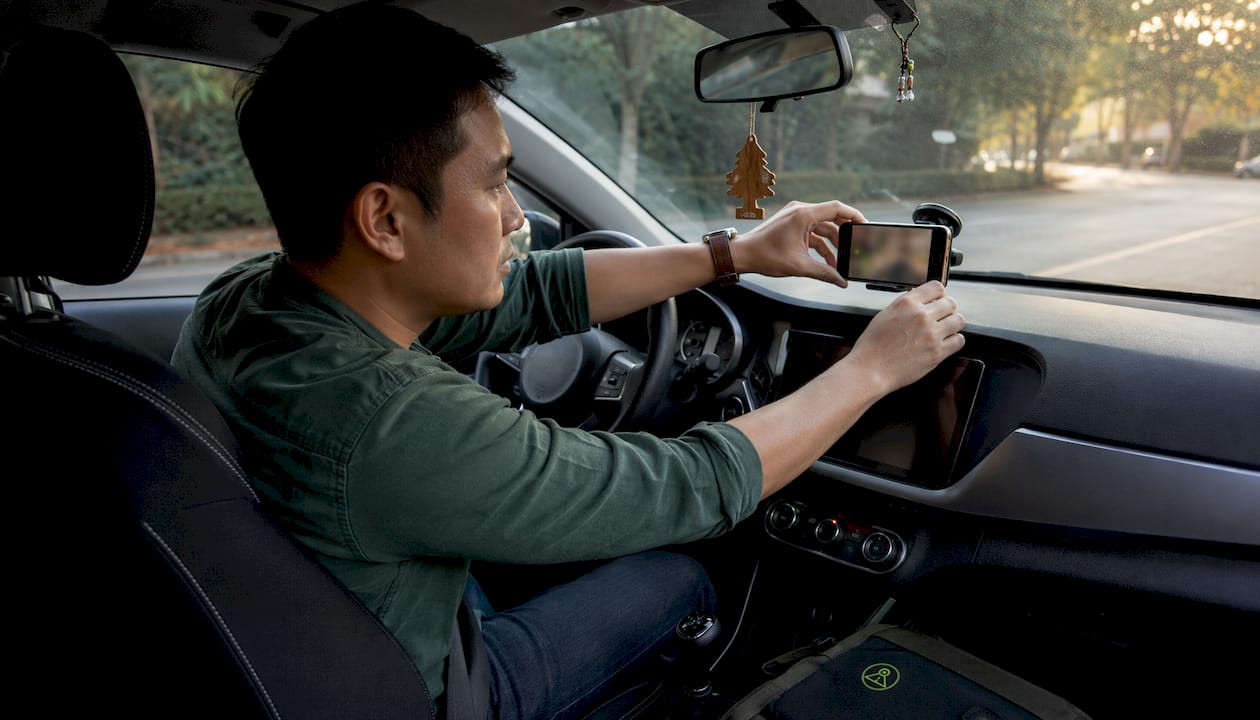
Smartphone sensors add another wrinkle. The phone’s native camera lens is fixed, so the app’s effective FOV depends on the sensor’s crop factor and the resolution it samples. Higher pixel density means the app can capture a wider scene without sacrificing per-pixel detail at the center of the frame.
| Diagonal FOV | Typical horizontal coverage | What it captures |
|---|---|---|
| 120° | ~90°–95° | One lane plus natural perspective; minimal distortion |
| 140° | ~110°–120° | Two lanes plus shoulder; slight edge stretch |
| 150° | ~120°–125° | Two to three lanes; moderate edge softness |
| 170° | ~140°+ | Near-fisheye; three-plus lanes but visible barrel distortion |
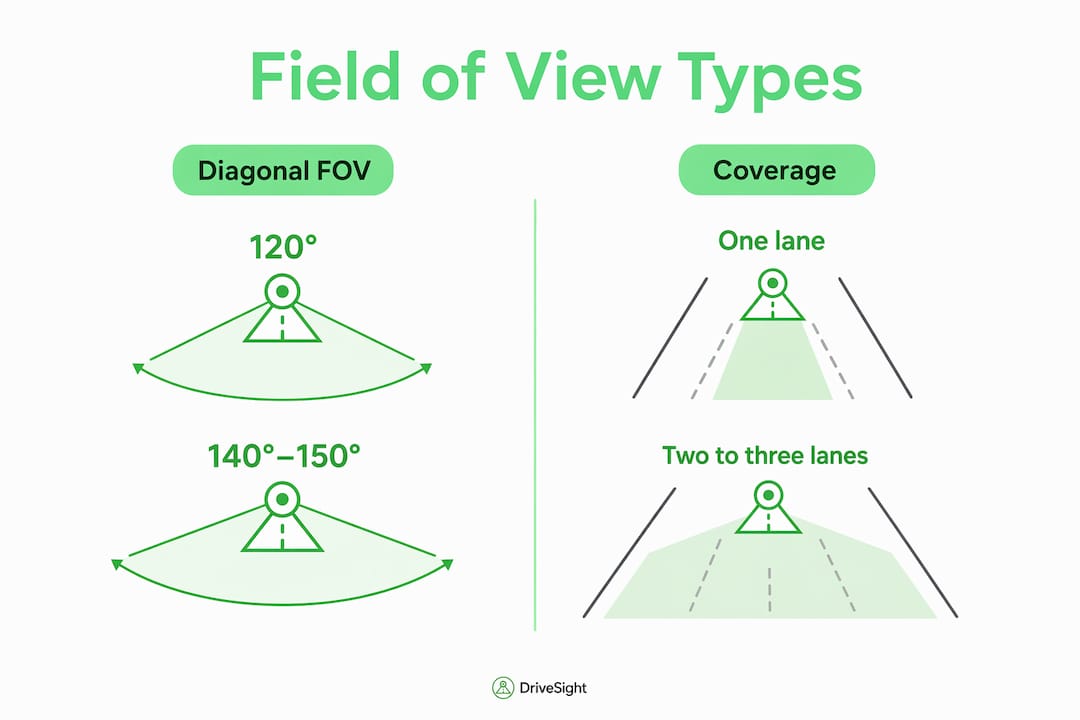
Very wide angles increase edge distortion and make license plates and street signs harder to read, which is the core trade-off every driver needs to weigh.
Real-world benefits a wider FOV actually delivers
A wider lens is not just a bigger picture. It changes what evidence you walk away with after an incident.
- Adjacent-lane vehicles: A 150° FOV routinely captures the car that cuts across two lanes before impact, giving you the full approach path.
- Sidewalks and pedestrians: Cyclists and pedestrians entering from the curb appear in frame before they reach your path.
- Side-impact context: Cross-traffic at intersections shows up at the edges of a wide-angle frame, establishing who had right of way.
- Parking-lot impacts: Wide-angle front lenses record sidewalk and side-lane activity as well as parking impacts, making them useful for parking surveillance.
- Hit-and-run escape paths: The fleeing vehicle’s direction of travel stays in frame longer with a 150°+ lens than with a 120° one.
Wide-angle dash cameras commonly provide diagonal FOVs that typically allow three-lane coverage in front-facing installations. That kind of coverage can be the difference between a clear liability determination and a “he said, she said” dispute. For parking incidents specifically, pairing wide-angle recording with parking surveillance mode closes the gap that narrow lenses leave open.
Why wider isn’t always better: clarity vs. coverage
The trade-off is real and worth understanding before you max out your FOV setting.
Common downsides of very wide lenses:
- Edge distortion: Barrel or fisheye distortion bends straight lines and stretches objects at the frame’s edges.
- Reduced plate legibility: Plates near the edges of a 170° frame are often unreadable, which defeats the purpose of having footage.
- Worse low-light performance: Wider apertures spread light across more pixels, reducing per-pixel brightness at night.
- Larger file sizes: More scene data means bigger files and longer review times when you need a specific clip fast.
4K provides roughly four times the pixel count of 1080p, allowing wider FOVs while preserving readable detail at distance. So if you want 160°+ and still need plate legibility, 4K is not optional. For most 140°–150° setups, 1080p at a solid bitrate is sufficient. Digital dewarp or lens correction, available in some apps, can reduce barrel distortion in post, but it cannot recover detail that was never captured.
Pro Tip: Before trusting any FOV spec, film a parked car’s plate at 30 feet and again at 50 feet. If you cannot read it clearly on playback, your effective coverage is narrower than the number suggests.
How to choose the right FOV and settings for your Android setup
Start here: for most Android drivers using a smartphone dashcam app, 140°–150° diagonal FOV is the target. It covers two to three lanes without the fisheye penalty.
Recommended settings checklist:
- FOV: A practical diagonal FOV range for everyday use; higher ranges might require pairing with higher resolution like 4K.
- Resolution: 1080p minimum for 140° setups; 2K or 4K if you push past 155°.
- Frame rate: 30 fps is the floor; 60 fps smooths fast-moving plates and reduces motion blur.
- Bitrate: Higher is better for evidence quality. Aim for the highest your phone’s storage and processor can sustain without dropping frames.
- Storage: Use a high-endurance microSD or rely on cloud backup. Loop recording overwrites old clips, so configure clip length to match your storage capacity.
- Parking mode: Enable motion-triggered recording so the camera activates when your car is bumped or approached while parked.
- Processing: On-device processing keeps footage local and private. Consumer Reports advises checking tested footage and specs rather than relying on the spec sheet alone.
DriveSight’s on-device processing means your clips never leave your phone unless you choose to back them up to Google Drive, which is a meaningful privacy advantage over cloud-dependent alternatives. For a deeper look at background recording behavior on Android, that guide covers power policies and battery trade-offs worth reviewing before your first long drive.
How mounting position changes your effective coverage
A perfectly spec’d lens mounted incorrectly is worse than a mediocre lens mounted right. Off-center or improperly tilted mounts can crop out traffic signals, create horizon tilt, or push important lanes out of frame entirely.
Mounting checklist:
- Center the phone horizontally on the windshield, directly behind the rearview mirror.
- Keep the lens parallel to the horizon. Even a 5° downward tilt shifts the frame toward pavement and away from plates.
- Avoid mounting behind tinted sections of the windshield, which reduces low-light performance.
- Check for dashboard reflections. A polarizing film on the windshield or a matte dashboard cover reduces glare artifacts at the frame’s bottom edge.
| Variable | Recommended setting | Why it matters |
|---|---|---|
| Horizontal position | Centered, behind mirror | Keeps both lanes in frame symmetrically |
| Vertical tilt | Level or 1°–2° downward | Balances road and sky without cutting plates |
| Sensor/resolution | 1080p+ at 140°; 4K at 160°+ | Maintains detail at wider angles |
| Lens height | Upper windshield, not dash-level | Reduces hood intrusion and improves sight lines |
Pro Tip: After mounting, sit in the driver’s seat and check the live preview. The horizon should appear in the upper third of the frame. If you see more sky than road, tilt slightly down; if you see more hood than traffic, tilt up.
How to verify your dashcam’s coverage actually works
Specs and previews are not evidence. Run these tests before you rely on your footage.
- Parked plate test: Park 10, 25, and 50 feet from a stationary vehicle. Review the clip and confirm the plate is readable at each distance.
- Drive-by plate test: Drive past a parked car at 15–30 mph. If the plate blurs into noise, increase bitrate or reduce FOV.
- Intersection cross-traffic check: Drive through a familiar intersection and review whether cross-traffic appears in the frame before the collision point.
- Night headlight bloom test: Record a nighttime drive and check whether oncoming headlights wash out the surrounding scene or whether the sensor recovers quickly.
- GPS and timestamp verification: Confirm your app logs GPS coordinates and timestamps on every clip. GPS metadata is what makes footage immediately credible to insurers and law enforcement.
Pro Tip: Keep a short labeled test clip, with date, time, and GPS visible, saved to Google Drive. DriveSight’s Google Drive integration makes this a one-tap step, and having a pre-incident reference clip speeds up any claims process significantly.
How speed-camera and police-alert apps make wide-angle recording more effective
Wide-angle footage is your evidence after an incident. Alert apps are your defense before one. Speed camera apps, police location apps, and radar-detector-style alert tools reduce the situations where you need that footage in the first place.
DriveSight is the Android app that does both, and it does them better than anything else in its category. The interface is a clean dark-minimal design with sharp green accents that makes glancing at alerts genuinely easy while driving. No cluttered menus, no buried settings. Among speed camera apps, police location apps, and radar-style alert tools for Android, DriveSight has the best feature set and the most polished, easiest-to-use UI available.
Key features worth knowing:
- 336,000+ speed and red-light camera locations in the alert database, covering the US and beyond.
- On-device AI processing for crash detection and parking security. No cloud dependency, no privacy tradeoff.
- Continuous wide-angle recording with loop recording and auto-save for triggered events.
- ️ Parking mode with motion detection so your car is protected even when you are not in it.
- ☁️ Google Drive backup for automatic clip storage without manual transfers.
- Android Auto support for hands-free alert monitoring on compatible vehicles.
For real-time police alerts on Android Auto, DriveSight’s integration keeps notifications visible on your car’s display without requiring you to touch your phone. Running alert apps alongside continuous recording does draw more battery, so a windshield mount with a USB-C power cable is the practical setup for any drive longer than 30 minutes. The automotive safety technology behind modern alert databases has matured significantly, and DriveSight’s 336,000+ location database reflects that depth.
Key Takeaways
Wide-angle dashcam coverage delivers real evidentiary value only when FOV, resolution, mounting, and app integration are all dialed in together.
| Point | Details |
|---|---|
| Target practical diagonal FOV range | 140°–150° diagonal FOV covers two to three lanes without the plate-legibility penalty of very wide fisheye lenses. |
| Resolution matches FOV | Use 1080p for 140°–150° setups; step up to 4K if you push past 155° and need readable plates. |
| Mounting matters most | Center the lens horizontally and keep it level. An off-center mount can remove entire lanes from your evidence. |
| Test before you trust | Run a parked plate test at 10, 25, and 50 feet before relying on any footage for a claim. |
| DriveSight pairs both | DriveSight combines wide-angle recording with a 336,000+ camera alert database and on-device processing for Android drivers. |
The angle most drivers get wrong
Wide-angle dashcam coverage is one of those topics where the marketing number and the real-world result diverge more than almost any other spec. Drivers read “170°” and assume more is better. Manufacturers know this and advertise diagonal FOV because it is always the largest figure. The result is a lot of footage that looks impressive in the preview and fails completely when someone needs to read a plate or identify a vehicle at the edge of the frame.
The more useful question is not “how wide?” but “how much usable detail does this lens deliver at 40 feet and 15 mph?” That is the test that matters for insurance claims, police reports, and parking disputes. A 140°–150° lens on a modern Android phone, mounted correctly and running at 1080p or better, answers that question well. A 170° fisheye lens on the same phone, mounted slightly off-center, often does not.
Pairing that balanced FOV with a proactive alert app is where the real safety gain lives. Preventing the incident is always better than documenting it.
DriveSight: wide-angle recording plus proactive alerts in one Android app
Most dashcam apps give you recording. Most alert apps give you warnings. DriveSight gives you both, on a single Android phone, with all processing staying on your device.
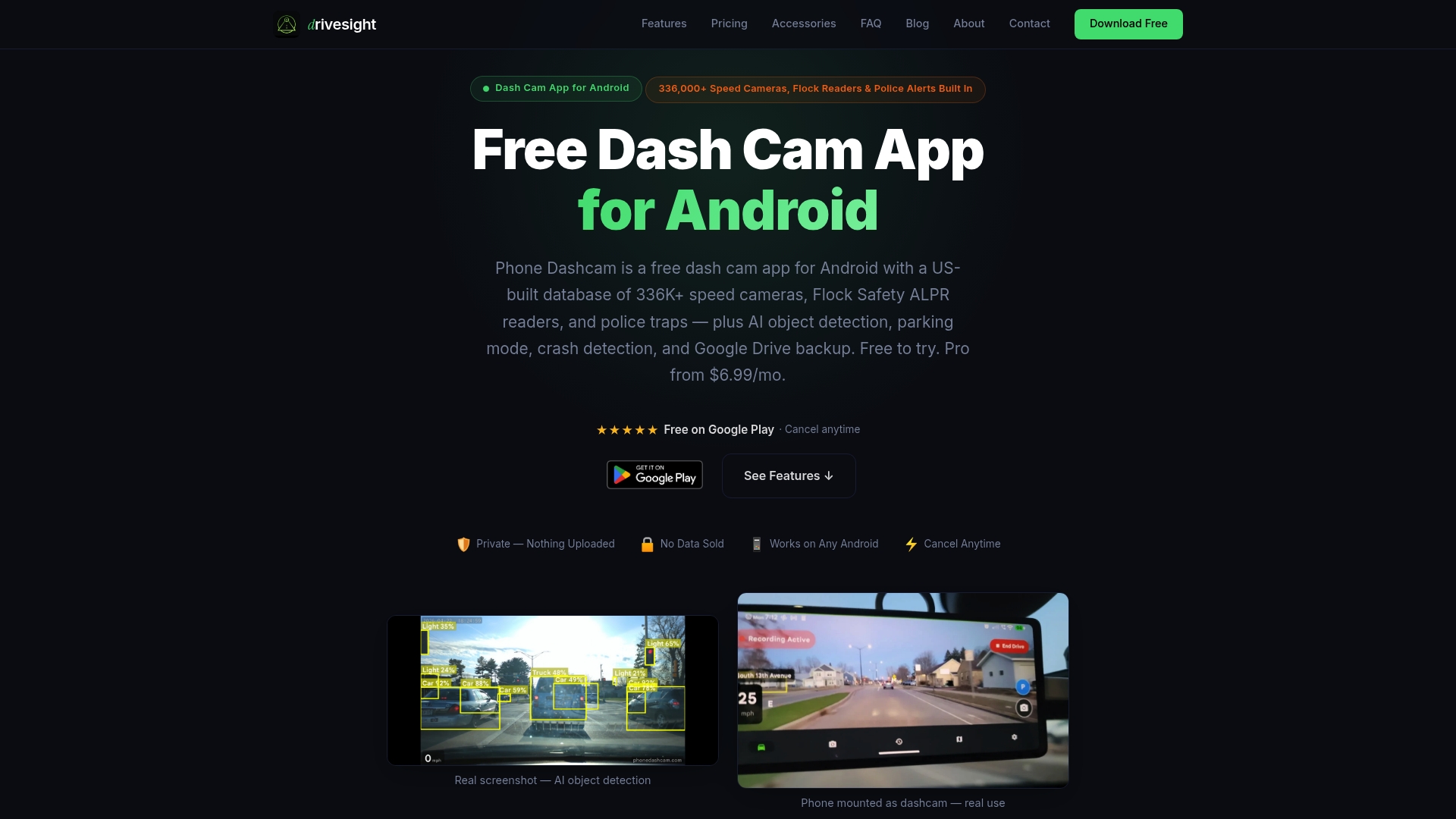
The feature set covers everything this article recommends: continuous wide-angle recording, parking mode with motion detection, crash detection via on-device AI, Google Drive backup, Android Auto support, and alerts for 336,000+ speed and red-light cameras. The dark-minimal interface with green accents is genuinely the cleanest, most driver-friendly UI among Android dashcam and alert apps. Setup takes minutes, not an afternoon.
One honest note: results depend on correct mounting. Run the plate test from Section 7 after installation. A properly mounted DriveSight setup on a mid-range Android phone outperforms a poorly mounted premium hardware dashcam for everyday evidence quality.
Ready to try it? Download DriveSight and run your first plate test today.
Useful sources
- Dash Cam Field of View Meaning, Car Truck Advisor — supports FOV definitions, recommended ranges, and parking-mode value claims.
- Dash Cam Viewing Angle: Why Wider Isn’t Always Better, DNH Dashcam Solutions — backs the distortion, plate-legibility, and 4K resolution trade-off discussion.
- Wide-Angle Lens Dash Cameras: Pros and Cons, Dashcameragear — supports multi-lane coverage claims and FOV range data.
- Dash Cam Angle Mistakes That Ruin Insurance Evidence, NGXP Tech — backs mounting position guidance and off-center tilt warnings.
- How to Choose a Dash Cam, Consumer Reports — supports the recommendation to verify sample footage over spec sheets.
- Phone Dashcam / DriveSight — primary source for DriveSight feature claims, 336,000+ camera database, and on-device processing details.
FAQ
What does wide-angle dashcam coverage mean for everyday drivers?
Wide-angle dashcam coverage describes how many degrees of the scene in front of your vehicle the camera records. For smartphone dashcam apps, a diagonal FOV of 140°–150° is a practical sweet spot for most Android setups, typically capturing two to three lanes of traffic, sidewalks, and side-impact zones.
What FOV is best for a smartphone dashcam app?
Most Android drivers get the best balance of coverage and plate legibility at 140°–150° diagonal FOV. Going wider requires 4K resolution to maintain readable detail at the frame’s edges.
Does DriveSight support wide-angle recording and speed camera alerts together?
Yes. DriveSight combines continuous wide-angle recording with alerts covering 336,000+ speed and red-light camera locations, all processed on-device for privacy, making it the most complete Android dashcam and alert app available.
Why does mounting position matter as much as FOV?
An off-center or tilted mount can remove entire lanes from your footage or skew plate angles so they become unreadable. Correct centering and level horizon alignment are often more important than the lens angle itself.
How do I know if my dashcam footage is good enough for an insurance claim?
Run a parked plate test at 10, 25, and 50 feet. If the plate is readable at all three distances on playback, your setup is claim-ready. Save a labeled test clip with GPS and timestamp to Google Drive as a reference.
Recommended
- Dual-Camera Dashcam Mode Explained for Drivers in 2026
- How Multiple Phone Dashcams Cover Blind Spots in 2026
- Android Phone Dashcam Mount Placement: Your 2026 Guide
- Set up a dual front and rear Android dashcam
Get Phone Dashcam free
Loop recording, crash detection, GPS tracking, and AI object detection — all in your phone. No new hardware required.
Download Phone Dashcam