Dashcam Resolution and Sharing: What Drivers Must Know
Dashcam Resolution and Sharing: What Drivers Must Know
TL;DR:
- Dashcam resolution determines the number of pixels captured per frame and affects the quality of shared footage. Higher resolutions like 4K retain more detail and read license plates at greater distances, making them suitable for legal evidence. However, sensor quality, frame rate, and bitrate significantly influence real-world video clarity beyond resolution alone.
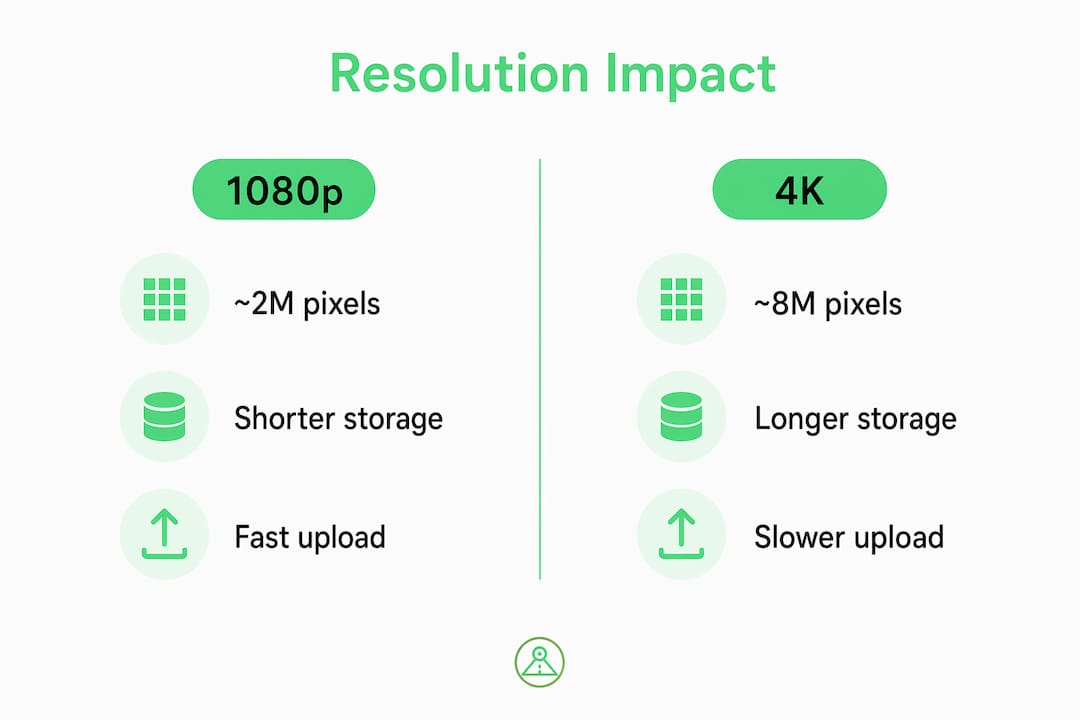
Dashcam resolution is defined as the number of pixels the camera captures per frame, and that number directly determines how useful your footage is when you share it for insurance claims, legal disputes, or personal documentation. A 1080p frame contains about 2 million pixels, while a 4K frame holds roughly 8 million. That difference is not cosmetic. It decides whether an adjuster can read a license plate, whether a lawyer can identify a road sign, and whether your video holds up under scrutiny. Understanding what dashcam resolution means for sharing is the first step toward recording footage that actually works when you need it most.

What does dashcam resolution mean for sharing footage?
Dashcam resolution determines how much visual detail survives when you send, upload, or present your video. A higher pixel count means more detail per frame. That detail is what lets a viewer zoom in on a specific area of the footage without the image falling apart.
4K footage stays legible under zoom, while 1080p footage pixelates quickly when enlarged. This matters enormously in legal and insurance contexts, where an adjuster or attorney may need to examine a small portion of the frame in detail. Sharing a blurry, pixelated clip is functionally the same as sharing no clip at all.
The three resolutions you will encounter most often are 1080p (1920×1080), 2K (2560×1440), and 4K (3840×2160). Each step up roughly doubles the pixel count. That progression translates directly to how far away the camera can capture readable detail on real roads.
How does resolution affect license plates and road sign clarity?
Resolution has a measurable effect on how far away your camera can capture readable text. 4K footage allows plate reading at 100+ feet in daylight, while 1080p footage becomes unreadable past about 30 feet. That gap is the difference between identifying the vehicle that hit you and filing a claim with no evidence.
The table below shows how pixel counts compare across common dashcam resolutions and what that means for practical detail capture.
| Resolution | Pixel count | Plate readability (daylight) | Best use case |
|---|---|---|---|
| 1080p | ~2 million | Up to ~30 feet | City driving, short trips |
| 2K (1440p) | ~3.7 million | Up to ~60 feet | Highway, mixed conditions |
| 4K | ~8 million | 100+ feet | Legal evidence, zoomed review |
The jump from 1080p to 2K is meaningful for highway driving, where vehicles pass quickly and distance matters. The jump from 2K to 4K is most valuable when footage will be reviewed frame by frame, zoomed in, or submitted as dashcam evidence for claims.
Pro Tip: When reviewing footage for evidence, pause the video and zoom in digitally before sharing. If the image falls apart at 2x zoom, the resolution is too low for that use case.
What else affects dashcam video quality beyond resolution?
Resolution is one factor. Sensor quality, frame rate, and bitrate each shape whether high-resolution footage is actually usable. A 4K camera with a poor sensor can produce worse footage than a well-built 1080p camera.
The Sony STARVIS 2 sensor outperforms older sensors in low light, which is critical for night driving. Smaller pixels in 4K sensors capture less light by default. This means a cheap 4K camera can produce worse night video than a quality 1080p camera with a larger sensor.
Frame rate matters at speed. Frame rates above 30 fps reduce motion blur on fast-moving vehicles. At highway speeds, a low frame rate turns license plates into smears, regardless of resolution. High resolution with low bitrate causes compression artifacts, which degrade the image even before you share it.
Key factors that determine real-world dashcam video quality:
- Image sensor size and technology (Sony STARVIS 2 vs. generic sensors)
- Frame rate (30 fps minimum; higher for highway use)
- Bitrate (higher bitrate preserves detail; low bitrate creates blocky artifacts)
- Lens aperture (wider aperture improves low-light performance)
- Night vision technology (infrared or enhanced sensors for parking and dark roads)
Pro Tip: For optimal video settings that balance resolution and frame rate, prioritize 30 fps at your chosen resolution before pushing to 4K at lower frame rates. Smooth, sharp 1080p footage is more useful as evidence than choppy 4K.
How do resolution settings affect file size and sharing convenience?
Higher resolution produces larger files. Larger files fill memory cards faster, take longer to upload, and can exceed the size limits on email or messaging apps. This is a practical constraint that affects how quickly you can share footage after an incident.
A 128GB card stores 16–20 hours of 1080p footage but only 8–10 hours of 4K. That difference matters for drivers who record continuously and need to retain footage from earlier in the day. Running out of storage before an incident occurs means losing the recording entirely.
| Resolution | Approx. file size per hour | Storage on 128GB | Upload speed impact |
|---|---|---|---|
| 1080p | ~6–8 GB | 16–20 hours | Fast |
| 2K (1440p) | ~10–12 GB | 10–12 hours | Moderate |
| 4K | ~12–16 GB | 8–10 hours | Slow |
Cloud sharing adds another layer. Large 4K files take significantly longer to upload over mobile data or home Wi-Fi. If you need to send footage to an insurance company quickly, a 1080p or 2K clip will reach them faster and with fewer compatibility issues. Most insurance portals and legal platforms accept standard MP4 files at 1080p without any conversion needed.
Smartphone apps that function as dashcams, like the DriveSight app, let you adjust resolution settings directly on your device. That flexibility means you can record at 2K for daily use and switch to 4K for specific trips where maximum detail is the priority. Understanding dashcam recording modes helps you match your settings to your actual sharing needs.
When should you choose higher resolution vs. standard options?
The right resolution depends on how you drive, what you record, and how you plan to use the footage. Higher resolution is not always the better choice when storage, processing power, and sharing speed are part of the equation.
Use this framework to match resolution to your situation:
- 1080p works well for city commutes, short trips, and drivers who share footage occasionally. Files are small, upload quickly, and play on any device without conversion.
- 2K (1440p) suits highway drivers and ride-share operators who need clearer detail at distance. It offers a practical balance between file size and image quality.
- 4K is the right choice when footage will be used as legal or insurance evidence, reviewed frame by frame, or zoomed in for detail. It is also the best option for capturing incidents at high speed or long range.
One important caveat: dual-channel “4K front + 4K rear” dashcams often upscale the rear feed rather than recording true 4K on both channels. The rear camera is frequently 1440p upscaled to 4K, which means the marketing claim does not match the actual output. If rear footage matters for your use case, verify the true sensor resolution before purchasing. For drivers using a smartphone app with dual camera support, the same principle applies. Check the dual camera setup details to confirm what each camera actually captures.
Key Takeaways
Dashcam resolution directly controls how much detail your footage retains when shared, but sensor quality, frame rate, and bitrate determine whether that resolution delivers usable video in real conditions.
| Point | Details |
|---|---|
| Resolution defines pixel count | 1080p captures ~2 million pixels per frame; 4K captures ~8 million. |
| Higher resolution aids evidence | 4K footage reads license plates at 100+ feet; 1080p fails past ~30 feet. |
| Sensor and bitrate matter equally | A quality 1080p sensor can outperform a cheap 4K camera in low light. |
| File size affects sharing speed | 4K fills a 128GB card in 8–10 hours vs. 16–20 hours for 1080p. |
| Match resolution to use case | Use 2K for daily driving; reserve 4K for legal evidence and detailed review. |
Our take on resolution vs. real-world sharing needs
The most common mistake drivers make is treating resolution as the only number that matters. We have seen this play out repeatedly: a driver records at 4K, the footage looks impressive on a big screen, but the bitrate was set too low and the video is riddled with compression artifacts the moment you zoom in. The resolution was there. The quality was not.
Our experience building and testing dashcam tools has reinforced one consistent truth: sensor quality and bitrate produce more usable evidence than raw pixel count alone. A Sony STARVIS 2 sensor at 1080p will capture a cleaner night incident than a generic 4K sensor with no low-light optimization. That is not a popular opinion in a market that sells on megapixels, but it is accurate.
The other misconception worth addressing is the dual 4K marketing claim. Most dual-channel dashcams advertised as “4K + 4K” are sharing a single processor between two feeds. The rear camera almost always receives less processing bandwidth, and the result is upscaled 1440p presented as 4K. If you are buying a dashcam specifically for rear-end collision documentation, verify the rear sensor specs independently.
For practical sharing, 2K is the resolution we recommend for most drivers. It produces files that upload quickly, play on any device, and retain enough detail for insurance and legal review. Reserve 4K for specific use cases where zoomed frame review is likely. And regardless of resolution, always check your bitrate settings first.
— Cyberlab Automation
DriveSight: record, review, and share footage from your Android
DriveSight turns your Android phone into a fully functional dashcam with adjustable video quality settings, GPS tagging, and cloud backup. You can set your recording resolution to match your storage and sharing needs, whether that is 1080p for quick daily uploads or higher quality for detailed documentation. The app includes remote viewing through the DriveSight viewer, so you can access and share footage without physically handling the device. Crash detection automatically saves and flags critical clips, making it straightforward to locate and send the footage that matters. For drivers who want reliable evidence capture without dedicated hardware, the free DriveSight dashcam app is a practical starting point.
FAQ
What does dashcam resolution mean for sharing?
Dashcam resolution defines the number of pixels recorded per frame. Higher resolution produces more detail, which makes shared footage clearer and more useful for insurance claims or legal review.
What is the best dashcam resolution for sharing evidence?
4K is the best resolution for legal and insurance evidence because it retains detail under zoom and reads license plates at distances beyond 100 feet in daylight. For everyday sharing, 2K offers a practical balance between clarity and file size.
Does higher resolution always mean better dashcam video quality?
No. Sensor quality, frame rate, and bitrate each affect real-world video clarity. A quality 1080p sensor can outperform a cheap 4K camera, especially in low-light conditions.
How does resolution affect dashcam file size and upload speed?
Higher resolution produces larger files. A 128GB card holds 16–20 hours of 1080p footage but only 8–10 hours of 4K. Larger files take longer to upload and may exceed size limits on insurance or legal platforms.
What does the dashcam resolution setting actually control?
The resolution setting controls how many pixels the camera records per frame. Changing it adjusts both the visual detail of the footage and the size of the video files stored on your device or memory card.
Recommended
- Best Dashcam Video Quality Settings for Clear Footage
- Dashcam recording modes explained for Android drivers
- Dashcam Setup for Long-Haul Truck Cabs: 2026 Guide
- Dual-Camera Dashcam Mode Explained for Drivers in 2026
Get Phone Dashcam free
Loop recording, crash detection, GPS tracking, and AI object detection — all in your phone. No new hardware required.
Download Phone Dashcam