Turn Your Android Phone Into a Free Dash Cam (No Hardware Required)
Affiliate disclosure: Some links on this page are Amazon affiliate links. As an Amazon Associate, we earn from qualifying purchases at no extra cost to you.
Yes, your Android phone can replace a dedicated dash cam. DriveSight (free on Google Play) provides loop recording, crash detection, 24/7 parking mode with motion detection, and 336,000+ Flock Safety ALPR and speed camera alerts — all running on any Android 8.0+ phone. No hardware purchase needed. Works completely offline.
You don't need to buy a dashcam. Your Android phone already has a better camera, more processing power, GPS, and cellular connectivity than any $200 hardware dashcam on the market.
The DriveSight app turns any Android into a full-featured dash cam — loop recording, crash detection, parking mode, AI detection, and 336,000+ speed camera alerts. Free to download. No account required.
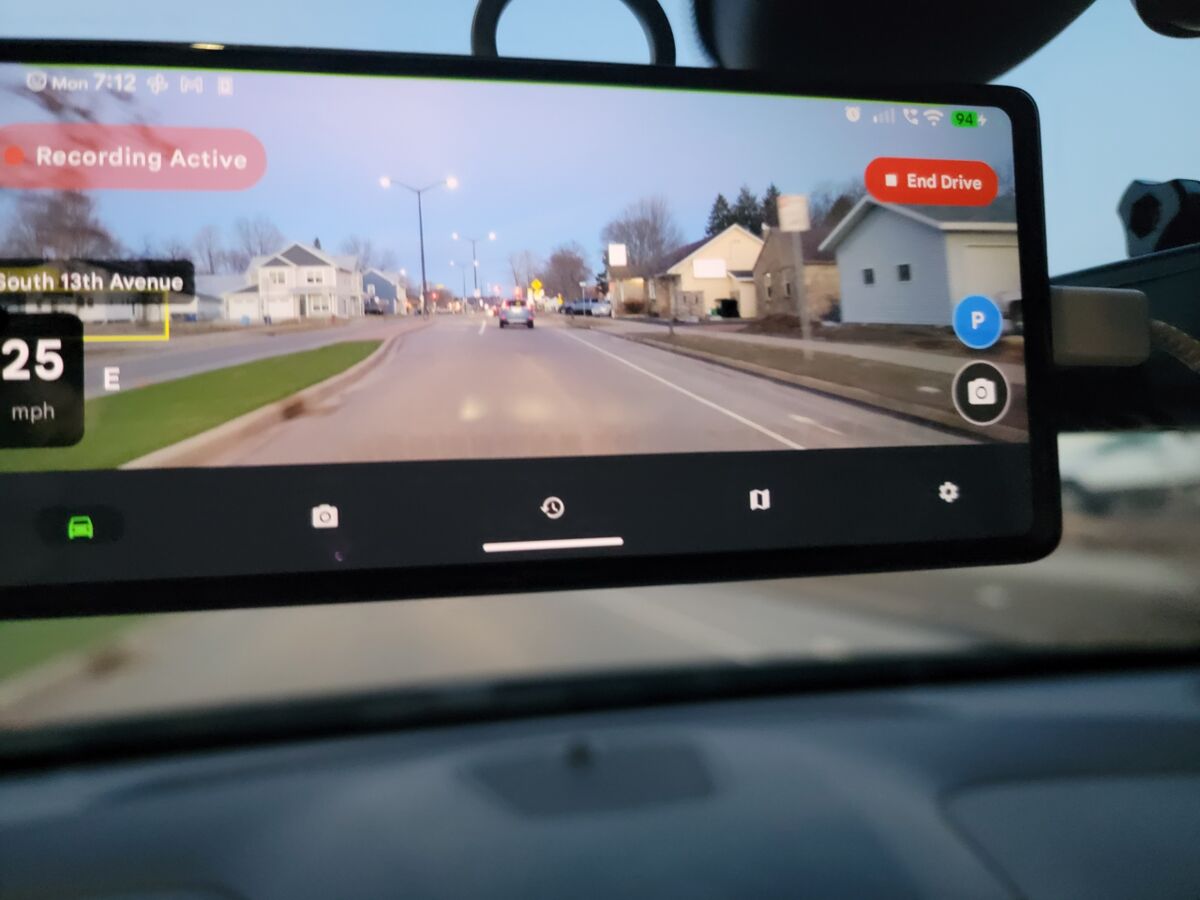
What a Dash Cam App for Android Can Do
A good android dash cam app isn't just a camera recording to a file. DriveSight handles the full set of features that dedicated hardware units offer — and several they can't:
Loop Recording
Continuous recording in segments. Old clips delete automatically when storage fills up. Important clips are saved permanently.
Crash Detection
Accelerometer-based impact detection saves and locks the current clip automatically on collision. Works in the background.
Parking Mode
Motion detection guards your car while parked. Screen stays off to save battery. Any movement triggers a recording.
AI Detection
On-device YOLO model detects vehicles, people and road hazards in real time, including brake lights on the car ahead.
Speed Camera & Flock Safety Alerts
336,000+ Flock Safety ALPR readers, speed cameras, red light cameras, and police speed traps across the US. Works offline. No hardware dashcam has this.
Google Drive Backup
Automatically backs up important clips to your personal Google Drive. Free, private, and works over WiFi at home.
GPS Speed Overlay
Records live GPS coordinates and speed on every clip. Useful for insurance claims, proving your speed at the time of an incident.
Dual Camera
Record front and rear cameras simultaneously on supported devices. Front camera captures road; rear captures interior.
Start recording in 60 seconds
Free to download. No sign-up, no account needed. Works on any Android 8.0+ phone.
Download Android Dash Cam AppAndroid Dash Cam App vs Hardware Dash Cam
Here's how DriveSight stacks up against buying a hardware dashcam for your car:
| Feature | DriveSight (Android App) | Hardware Dash Cam ($100–$300) |
|---|---|---|
| Cost | Free (phone you own) | $100–$300 upfront |
| Loop Recording | Yes | Yes |
| Crash Detection | Yes, auto-saves clip | Yes |
| Parking Mode | Included free | Requires $40–$60 hardwire kit |
| Speed Camera Alerts | 336,000+ cameras | Not available |
| AI Object Detection | Vehicles, people, road hazards | Not available |
| Cloud Backup | Free via Google Drive | $10/month subscription |
| GPS Tracking | Built into phone | Extra $30–$50 on most models |
| Software Updates | Regular app updates | Rarely updated after launch |
| Remote Live View | WebRTC browser viewer | Requires subscription service |
| Installation | Download from Play Store | Mount, run cable, hardwire or plug in |
How to Set Up Your Android as a Dash Cam
Takes about 60 seconds. Works on any Android phone made after 2017.
Download DriveSight from Google Play
Search "DriveSight" on the Play Store or tap here to install. It's free. No account, no sign-up, no email required.
Mount your phone on the windshield
Any windshield suction mount or vent clip holder works. Position it so the rear camera points at the road. Most drivers mount behind the rearview mirror to keep the view clear.
Plug into a car charger
Connect the phone to your car's USB charger port. This keeps the phone powered during long drives and ensures parking mode stays active overnight.
Tap "Start Drive" — that's it
Open DriveSight and hit Start Drive. Loop recording begins immediately. Crash detection is live. GPS tracking starts. When you park, tap "Park" to switch to parking mode with motion detection.
Windshield Phone Mounts for Dashcam Use
From $10.99Free vs Pro — What You Get
DriveSight is free to download and free to use for basic dashcam recording. Pro unlocks the advanced features:
Free
Loop recording, crash detection, impact alerts, storage settings, video quality settings, sound effects, haptic feedback, trip retention.
Pro — $4.99/month
AI detection (animals, vehicles, people), parking mode, dual camera, speed camera alerts, police alerts, wildlife hotspot warnings, cloud backup, no ads.
Pro is available as a monthly subscription ($4.99/month) or annual plan ($29.99/year). You can start with the free version and upgrade anytime from within the app.
Which Android Phones Work?
DriveSight works on any Android device running Android 8.0 (Oreo) or higher — that's essentially every Android phone made after 2017. Tested and working on:
- Samsung Galaxy S8, S9, S10, S20, S21, S22, S23, S24 series
- Samsung Galaxy A series (A50 and newer)
- Google Pixel 2, 3, 4, 5, 6, 7, 8, 9 series
- OnePlus 5T, 6, 7, 8, 9, 10, 11 series
- Motorola Moto G series (G6 and newer)
- Xiaomi Mi, Redmi, POCO series (2018+)
- LG G7, V40, V50 and newer
- Budget phones from Nokia, Realme, TCL (Android 8.0+)
For best performance, a phone with 3GB+ RAM and Android 10 or higher is recommended. Even phones with 2GB RAM handle basic recording and parking mode well.
Car Chargers for Dash Cam Phones
From $8.99The best android dash cam costs $0
Install DriveSight on any Android phone and start recording in under a minute. No hardware purchase, no subscription required to start.
Get the Free Android Dash Cam AppFrequently Asked Questions
What is the best free dash cam app for Android?
DriveSight is the top-rated free dash cam app for Android. It includes loop recording, crash detection, parking mode, AI animal and vehicle detection, and 336,000+ speed camera alerts — all free to download with no sign-up required.
Can I use my Android phone as a dash cam?
Yes. Any Android phone running Android 8.0 or newer works as a dash cam with the DriveSight app. It handles continuous loop recording, crash detection, parking mode, and cloud backup automatically.
Does a dash cam app drain my Android battery?
DriveSight is built for long-term use and should always be used with a car charger plugged in. Connected to power, it records indefinitely without draining the battery. Parking mode is optimized to minimize draw when the car is off.
Is there a dash cam app for Android with speed camera alerts?
DriveSight Pro includes 336,000+ speed camera and red light camera locations across the US and Canada, plus real-time police position data via Waze integration. No hardware dash cam offers this combination.
Does the Android dash cam app work with Android Auto?
DriveSight runs independently on your phone without requiring Android Auto. Recording continues in the background even when other apps or Android Auto are in the foreground.
More Dashcam Resources
Want to go deeper? Here are more guides on using your Android as a dashcam: