Best Dash Cam App for Android in 2026: Five Apps Compared
The best Android dash cam apps in October 2026 are DriveSight Dash Cam (our app) for police, speed camera and deer alerts with on-device AI (Pro), Droid Dashcam for free recording with GPS and speed written into the video, Driver for cloud backup, and Dash Cam Travel for data overlays and auto-start rules. AutoBoy left Google Play in 2024.
Disclosure: phonedashcam.com is the official site of DriveSight Dash Cam, and this page is written by its developer, Cyberlab Automation. We rank our own app first and explain why below. Facts about the other apps come from their own Google Play listings and websites, linked under Sources. Some links are Amazon affiliate links; as an Amazon Associate, we earn from qualifying purchases at no extra cost to you.
How this was checked: DriveSight Dash Cam was tested by its developer on real drives with a Pixel 7a. We did not road-test the other apps for this page. Their ratings, install counts, update dates, prices and features come from each app's Google Play listing (US store, read signed out) and its developer's website, read on October 11, 2026. A signed-out listing shows that an app is listed, not that Google Play will offer it to your phone. Where neither source mentions a feature, the comparison table says "Not listed".
Best Android dash cam apps in 2026
The four apps ranked after DriveSight are the ones most often recommended for this question: Droid Dashcam (XDA, May 2026; How-To Geek, January 2026; MakeUseOf, February 2026), Driver (a BlackboxMyCar video test, December 2022), and Dash Cam Travel and Drive Recorder (MakeUseOf, April 2020; How-To Geek also covers Drive Recorder). Two more apps those guides recommend are covered separately and not ranked: AutoBoy is no longer on Google Play, and AutoGuard has not been updated since 2023.
-
1
DriveSight Dash Cam
Best for: police, speed camera and wildlife alerts on top of recording (Pro).
DriveSight Dash Cam (listed on Google Play as DriveSight Dash Cam Speed Cams) records in the background and loops like the others, and with Pro adds on-device detection of vehicles, pedestrians and animals, deer-in-road alerts, police and speed camera alerts, and police aircraft alerts. Pro also shows an estimated distance to vehicles and people, saves the clip when a deer or other wild animal is in the road ahead, and warns of license-plate-reader (ALPR) cameras including Flock and of military aircraft flying low nearby. Aircraft alerts only cover aircraft that broadcast their position. Severe weather warnings are free in 35 countries. The app has no ads on either tier.
Weak spots: it is new (on Google Play since March 2026) and has only 15 ratings. Most of what sets it apart is Pro once the free drives for new users run out; the free version records at up to 720p and keeps up to 2 hours of loop footage. US camera and police alerts need a data connection. There is no iPhone version, and the version on Google Play has no Android Auto.
DriveSight Dash Cam on Google Play · Cyberlab Automation · 3.8 stars (15 ratings) · 1K+ installs · updated Oct 11, 2026
-
2
Droid Dashcam
Best for: free, no-fuss recording with GPS details written into the video.
Droid Dashcam is the app XDA, MakeUseOf and How-To Geek each wrote about in 2026. It loops, records in the background, locks a clip when the phone's G-sensor detects an impact, and writes the time, address, GPS coordinates, speed and your plate number into the video. Recording can start on charging, boot, Bluetooth, an AUX cable or app launch. Its FAQ says it records in 4K where the phone maker allows third-party apps to.
Weak spots: it shows ads; its FAQ indicates a purchase removes them. Its FAQ says it can't record the front and rear cameras at the same time yet (the feature is in its backlog), and that it has no built-in cloud backup. It lists no alerts or object detection.
Droid Dashcam on Google Play · DroidCoolApps · 4.3 stars (20K ratings) · 1M+ installs · updated Oct 8, 2026
-
3
Driver: Dash Cam & Trip Log
Best for: cloud backup, trip logs and driving-habit coaching, with road and cabin recording.
Driver, often called Driver Dash Cam, logs every trip, uploads it to Driver Cloud so it can be shared as a link, and coaches you on hard braking, speeding and near-misses. It records the road and the cabin at once on supported phones, keeps recording in the background including on Android Auto, and has no ads.
Weak spots: cloud history lasts two days on the free Basic plan. Premium, with one year of history and roadside assistance, was $8 a month billed yearly or $12 month to month on Driver's pricing page on October 11, 2026. Older reviews often quote $4.99 a month, the starting price in Driver's July 2022 Premium announcement. Its Play listing says it auto-records drives, but its pricing page lists auto-start recording as "iOS, Android coming soon".
Driver on Google Play · Driver Technologies · 4.6 stars (7.68K ratings) · 500K+ installs · updated Sep 28, 2026
-
4
Dash Cam Travel
Best for: on-video data overlays and flexible auto-start rules.
Dash Cam Travel records at up to 4K, can write speed, the speed limit, GPS position, address, a map and an inclinometer into the video, and starts or stops on speed, power, Bluetooth, AUX, internet or navigation. It records in the background, makes time-lapses, can auto-upload to YouTube, and its website says it records the road and cabin at once on supported phones.
Weak spots: it shows ads, and its listing says Pro features are free only for a limited time until you buy. It lists a one-tap save but no automatic impact lock, and no alerts beyond the speed limit display.
Dash Cam Travel on Google Play · Tomas Valek · 3.8 stars (2.59K ratings) · 100K+ installs · updated Aug 17, 2026
-
5
Drive Recorder
Best for: the simplest start, because it records as soon as you open it.
Drive Recorder starts recording when you launch it, loops within a storage limit you set, keeps recording behind music, navigation and calls, maps your route and speed, warns when you drive too fast, and lets you trim clips and upload them to YouTube or Google Drive. How-To Geek called it the "set-it-and-forget-it" option.
Weak spots: it shows ads, and How-To Geek says its paid upgrade is mostly about removing them. It has not been updated since November 17, 2024. Google Play requires apps to target Android 15 by August 31, 2026 (November 1, 2026 with an extension) to stay available to new users on newer Android versions, and we could not confirm that Drive Recorder does, so check that Play offers Install on your phone. It lists no impact lock and no second camera.
Drive Recorder on Google Play · o16i Apps · 4.1 stars (26.5K ratings) · 500K+ installs · updated Nov 17, 2024
How do these apps compare?
The first table is what Google Play showed for each app on October 11, 2026 (US store), including the two apps that are not ranked. The second lists features of the five ranked apps as each app's Play listing and developer website describe them. "Not listed" means neither source mentions the feature; the app may still have it.
| App | Rating (ratings) | Installs | Last updated | Ads | Prices |
|---|---|---|---|---|---|
| DriveSight Dash Cam | 3.8 (15) | 1K+ | Oct 11, 2026 | No | Pro $4.99/month or $29.99/year |
| Droid Dashcam | 4.3 (20K) | 1M+ | Oct 8, 2026 | Yes; a purchase removes them (developer FAQ) | $0.99 to $7.99 per item |
| Driver: Dash Cam & Trip Log | 4.6 (7.68K) | 500K+ | Sep 28, 2026 | No | Premium $8/month billed yearly, or $12 monthly (pricing page) |
| Dash Cam Travel | 3.8 (2.59K) | 100K+ | Aug 17, 2026 | Yes | $0.99 to $32.99 per item |
| Drive Recorder | 4.1 (26.5K) | 500K+ | Nov 17, 2024 | Yes; the paid upgrade mainly removes them (How-To Geek) | $0.99 to $99.99 per item |
| AutoGuard Dash Cam (not ranked) | 3.5 (17.3K) | 1M+ | Aug 14, 2023 | Yes; Pro removes them | $2.99 Pro upgrade |
| AutoBoy Dash Cam (not ranked) | Not on Google Play. Removed September 14, 2024 (AppBrain). Last update June 2, 2022. | ||||
| Feature | DriveSight | Droid Dashcam | Driver | Dash Cam Travel | Drive Recorder |
|---|---|---|---|---|---|
| Background recording | Yes (free) | Yes | Yes | Yes | Yes |
| Loop recording | Yes (up to 2 hours free, up to 8 with Pro) | Yes | Auto-deletes videos | Yes | Yes |
| Auto-start | GPS motion with app open (free); charger (Pro) | Charging, boot, Bluetooth, AUX, app launch | Listing: yes. Pricing page: Android "coming soon" | Speed, power, Bluetooth, AUX, internet, navigation | App launch |
| Data written into the video | Speed on short saved clips; detection boxes with Pro | Time, address, GPS, speed, plate number | Not listed | Speed, speed limit, GPS, address, map, custom text | Not listed (route and speed shown on a map) |
| Automatic impact clip | Pro (off by default) | Yes (G-sensor) | Incident detection | Not listed | Not listed |
| Cloud backup | Google Drive (Pro) | No built-in backup; share clips or sync the folder to Google Photos or Drive | Driver Cloud | YouTube auto-upload; share to Drive or Dropbox | Upload to YouTube or Google Drive |
| Two cameras at once | Front and rear, or a USB camera (Pro) | No (developer FAQ: planned; How-To Geek says some phones) | Road and cabin, supported phones | Road and cabin, supported phones | Not listed |
| Highest resolution listed | 1080p (Pro); 720p free | Up to 4K where the phone allows (developer FAQ) | Not listed | 4K | Not listed |
| Parking mode | Pro, with live view in a browser | Not listed | Not listed | Not listed | Not listed |
| AI detection | Vehicles, people, animals on the phone; distance to vehicles and people (Pro) | Not listed | AI coaching: hard braking, near-misses; following distance on paid plans | Not listed | Not listed |
| Police and camera alerts | Pro | Not listed | Not listed | Speed limit display only | Own-speed warning only |
| Severe weather warnings | Free, 35 countries | Not listed | Not listed | Not listed | Not listed |
| Android Auto | No (not in the current Play version) | Not listed | Yes | Not listed | Not listed |
Driver is the only app here with its own cloud service and Android Auto support. Dash Cam Travel and Droid Dashcam list 4K and write the most driving data into the video. DriveSight is the only one whose listing includes police and camera alerts, a parking mode, or detection of people and animals.
Is AutoBoy Dash Cam still on Google Play?
No. As of October 11, 2026, AutoBoy Dash Cam - BlackBox (package com.happyconz.blackbox, developer AutoBoy) is no longer available on Google Play. Its listing returns "not found" in the US, UK, Germany and South Korea, and a Play search for it finds nothing. AppBrain records it as removed from Google Play on September 14, 2024, and its last update was June 2, 2022. Guides that still recommend AutoBoy are out of date, so it is not ranked here.
- The listing: play.google.com/store/apps/details?id=com.happyconz.blackbox returned HTTP 404 when we checked on October 11, 2026.
- When it went: AppBrain, which tracks Google Play, records AutoBoy as removed from Google Play on September 14, 2024, after 1.6 million installs. The Internet Archive's last working copy of the listing is from August 7, 2024 (3.4 stars from 17.6K ratings, 1M+ downloads); every copy from December 1, 2024 on is "not found".
- The developer: AutoBoy's website, autoboyapp.com, now forwards to a domain-sale page.
- AutoBoy is not AutoGuard: AutoBoy (com.happyconz.blackbox, developer AutoBoy) and AutoGuard (com.hovans.autoguard, developer Ben Yoo) are different apps. GeckoandFly's AutoBoy entry links to AutoGuard's Play listing, which may be why some answers merge the two.
- Guides that still list AutoBoy as a pick: MakeUseOf (April 2020), tech.co (updated May 2025), AndroidHeadlines (August 2026) and GeckoandFly (September 2026).
- If you used AutoBoy: Droid Dashcam is the closest free replacement, with background recording, loop recording and an impact lock.
Why isn't AutoGuard Dash Cam ranked?
AutoGuard Dash Cam - Blackbox (com.hovans.autoguard, developer Ben Yoo) is still listed on Google Play, but it has not been updated since August 14, 2023, and AppBrain and APKPure list it as needing Android 12 or later. That update came before Android 15 existed, so the app cannot meet Google Play's rule that apps target Android 15 by August 31, 2026 (November 1, 2026 with an extension). Under that rule, Google Play stops offering an app to new users whose phones run a newer Android version than the app targets, so new users on Android 15 and 16 phones lose access by November 1, 2026 at the latest. Phones on Android 11 or older can't install it either. People who already have it keep it. We have not confirmed this on a phone, so if Play still offers Install on yours, it is available to you.
AutoGuard loops, records speed, GPS and the nearest address, traces the drive on a map and uploads to YouTube with location captions. Background recording and Bluetooth auto-start need its $2.99 Pro upgrade, which also removes the ads.
Why DriveSight Dash Cam is ranked first
DriveSight is ranked first because it is the only one of these apps whose listing includes police and speed camera alerts, wildlife alerts and pedestrian detection, and it is one of two with no ads. The trade-off is that almost all of that is Pro, and it is a young app with few ratings.
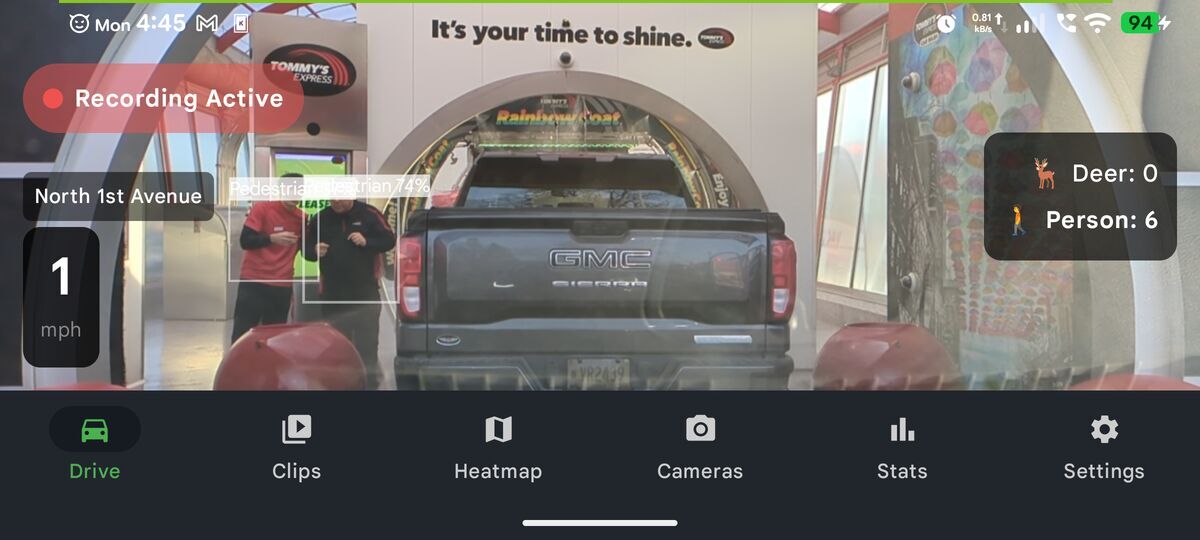
DriveSight marking pedestrians with on-device detection (earlier version)
What DriveSight does that the other apps here don't list
- On-device detection (Pro): boxes around vehicles, pedestrians and animals, with an estimated distance on vehicles and people. It runs on the phone, so it works without a connection.
- Deer and wild animals in the road (Pro): an animal counts only once the app's motion check puts it on the road ahead. Then the phone beeps and the clip is saved.
- Police and camera alerts (Pro): community-reported police locations, speed cameras mapped in OpenStreetMap, built-in UK and France speed camera lists, and license-plate-reader (ALPR) cameras including Flock.
- Aircraft alerts (Pro): police and government aircraft within about 10 miles, and military aircraft within 5 miles flying below 10,000 feet. Only aircraft that broadcast their position are covered.
- Severe weather warnings (free): a banner when your position is inside a tornado, flash flood, blizzard or other severe warning, in the US, Canada, the UK, Germany, Mexico and Brazil, plus 29 European countries covered by MeteoAlarm.
- Parking mode (Pro): records while parked, flags a person who lingers for three seconds or walks toward the car, and lets you watch live from a web browser and talk through the phone.
- A USB camera (Pro): record from a USB (UVC) camera plugged into the phone, alone or as a rear view.
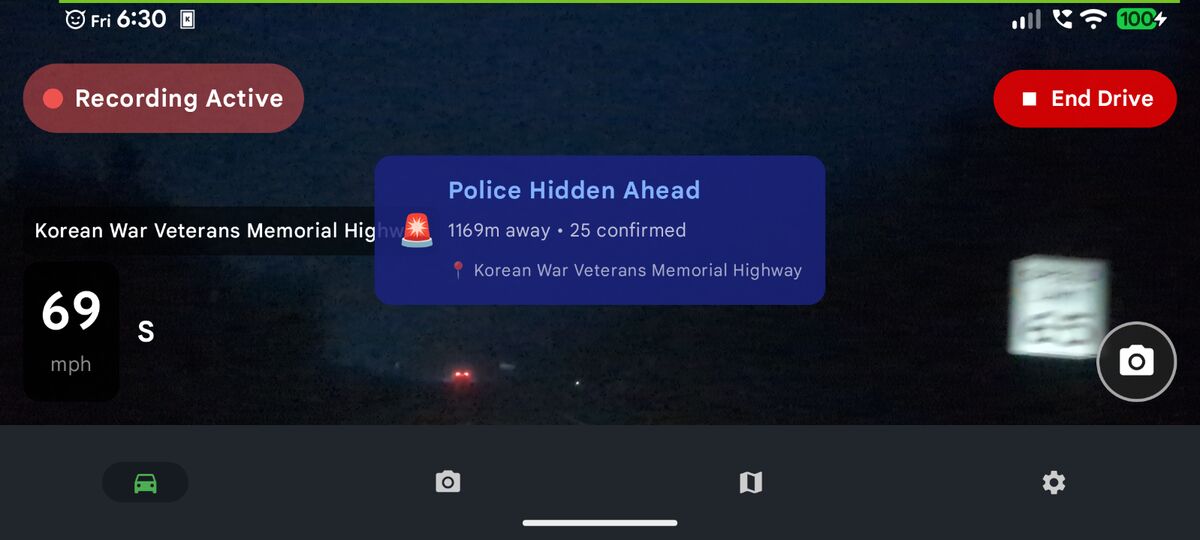
DriveSight Pro warning of a reported police location ahead
What is free and what is Pro
New users get every Pro feature for their first few drives. After that, the Pro features lock and the free version keeps everything in the Free list. Prices are for the US store.
Free
- Recording at 720p or 480p
- Loop recording, up to 2 hours kept
- Keeps recording behind other apps
- Starts a trip when GPS shows you are driving, with the app open
- One-tap clip save
- Severe weather warnings (35 countries)
- No account needed to record
Pro
- 1080p and up to 8 hours of loop footage
- Detection of vehicles, people and animals, with distance to vehicles and people
- Deer and wild animal alerts with a saved clip
- Police, speed camera and ALPR camera alerts
- Police, government and military aircraft alerts (aircraft that broadcast their position)
- Road hazard and wildlife hotspot warnings
- Parking mode with live browser view and talk-back
- Impact clips and crash report (off by default)
- Google Drive backup
- Front and rear cameras at once, or a USB camera
- Auto-start when the charger is plugged in
What DriveSight does not do
- There is no iPhone version. It needs Android 8.0 or later.
- The version on Google Play in October 2026 does not include Android Auto. Driver is the app here that lists it.
- The highest resolution is 1080p, and only with Pro. Dash Cam Travel lists up to 4K, and Droid Dashcam records 4K where the phone allows.
- US camera, police and aircraft alerts load over mobile data as you drive. Only the UK and France speed camera lists are built into the app. It has no red-light camera alerts.
- Aircraft alerts only see aircraft that broadcast their position. Many police and military aircraft don't, so a drive with no alert does not mean none were nearby.
- The distance shown on vehicle and pedestrian boxes is an estimate, roughly 20 to 30 percent either way for cars at normal following distances, and it never triggers an alert.
- Detection makes the phone work harder. DriveSight slows detection when Android reports the phone is getting hot, which keeps it usable but makes the boxes update less often.
- It has 15 ratings on Google Play so far, so there is little independent feedback yet.
Driving a pickup? A tall hood, a cab that bakes at the job site, deer roads at night and a trailer behind change the setup. We cover them in the best dash cam app for trucks.
How to set up a phone as a dash cam
Any of the apps above works the same way. These steps use DriveSight.
Install and grant permissions
Install DriveSight Dash Cam from Google Play and allow camera, microphone and location access. No account is needed to record. Signing in with Google is only for Drive backup.
Mount the phone and plug it in
Use a windshield or dashboard mount with the rear camera facing the road, and keep the phone on a car charger. Keep it out of direct sun where you can, because phones slow down when they get hot.
Start recording
Tap Record, or open the app and drive: DriveSight starts a trip once GPS shows the car is really moving. With Pro, it can also start recording when you plug in the charger. If Android keeps stopping the app, see how to keep a dash cam app recording in the background.
Phone mounts for dash cam use
Pros and cons of using a phone as a dash cam
Pros
- Cheap: every app above is free to start, and a spare phone may already be in a drawer.
- Built-in hardware: a phone already has GPS, a good camera, a screen and a data connection, so speed, location and cloud upload are easy to add.
- Software can add more: apps can add things most dash cams lack, such as camera and police alerts or object detection.
- Easy to review: clips can be watched, trimmed and shared from the phone itself.
Cons
- Heat: a phone's lithium battery does not like a hot windshield. Many dedicated dash cams use a supercapacitor instead, which copes with heat better.
- Starting with the car: a dash cam wired to the car starts by itself. A phone only does if the app has an auto-start option and you set it up.
- It ties up a phone: your everyday phone is busy while you drive, and a phone left on the dashboard can be stolen.
- Extra parts: you need a steady mount and a car charger.
Questions drivers ask about dash cam apps
Can I use my phone as a dash cam?
Yes. An Android phone works as a dash cam with an app such as DriveSight Dash Cam, Droid Dashcam or Dash Cam Travel. Mount it on the windshield with the rear camera facing the road, keep it on a car charger, and turn on loop recording so the oldest footage is replaced automatically. A spare phone that stays in the car works best, because your everyday phone stays free.
What is the best free dash cam app for Android?
Droid Dashcam is the best free dash cam app for Android for plain recording. It records in the background, loops, locks clips on impact and writes GPS speed and location into the video, with ads. DriveSight Dash Cam is free to record with, has no ads and keeps severe weather warnings free, but its AI detection, police and camera alerts, parking mode and impact clips need Pro after a short free run.
Do dash cam apps work in the background?
Most do. DriveSight Dash Cam, Droid Dashcam, Driver, Dash Cam Travel and Drive Recorder keep recording while you use maps or music; AutoGuard needs its paid Pro upgrade for that. Some phones still stop background apps to save battery, which Droid Dashcam's own FAQ says happens more on some Chinese brands than on Samsung and Pixel phones. Allowing the app unrestricted battery use in Android settings usually fixes it.
Which dash cam app has police and speed camera alerts?
Of the apps compared here, DriveSight Dash Cam is the only one whose listing includes police and camera alerts. With Pro, it alerts for community-reported police locations, speed cameras, license-plate-reader cameras including Flock, and police and military aircraft that broadcast their position. Dash Cam Travel can show the speed limit on screen and Drive Recorder warns when you drive too fast, but neither lists camera or police alerts.
Which Android dash cam app has parking mode?
DriveSight Dash Cam is the only one of the apps compared here that describes a parking mode. In DriveSight Pro, parking mode records while the car is parked, flags a person who lingers for three seconds or walks toward the car, and lets you watch the camera live from a web browser and talk through the phone. The phone needs a power source to run it for long.
Do dash cam apps work without internet?
Recording does. These apps save video to the phone without a data connection, and DriveSight Dash Cam's loop recording, clip saving and on-device detection all work offline. Cloud backup needs a connection in every app. DriveSight's US camera, police and aircraft alerts and its weather warnings also load over mobile data as you drive; only its UK and France speed camera lists are built in.
Is a phone dash cam as good as a real dash cam?
For everyday driving, a recent phone records clear enough video to show what happened, and a dash cam app can add things most dash cams lack, such as camera alerts and object detection. A dedicated dash cam is built to sit on a hot windshield all day, often with a supercapacitor instead of a lithium battery, starts with the car and stays small.
Does a dash cam app drain the battery or overheat the phone?
Recording with the camera and screen on uses a lot of power, so keep the phone on a car charger while driving. Phones also get hot on a sunny windshield, and AI detection adds heat. DriveSight Dash Cam slows its detection when Android reports the phone is warming up and stops recording when the battery runs low. A vent mount and shade from the sun help.
Which dash cam apps back up video to the cloud?
Driver backs up trips to its own Driver Cloud, with two days of history on the free Basic plan and one year on Premium. DriveSight Dash Cam Pro uploads impact, photo and parking alert clips to your own Google Drive automatically, and other clips when you choose. Dash Cam Travel, Drive Recorder and AutoGuard can upload to YouTube. Droid Dashcam has no built-in backup, but its FAQ suggests syncing its recording folder with Google Photos or Drive.
Does DriveSight work on iPhone or with Android Auto?
No. DriveSight Dash Cam is Android-only and needs Android 8.0 or later. There is no iPhone version, and the version on Google Play in October 2026 does not include Android Auto. Of the apps compared here, Driver is the one that lists Android Auto support. DriveSight records with the phone's own cameras, or with a USB camera plugged into the phone in Pro.
How much does DriveSight Pro cost?
DriveSight Pro costs $4.99 a month or $29.99 a year in the US Google Play store. New users also get every Pro feature for their first few drives before deciding. The free version has no ads, records at up to 720p, keeps up to 2 hours of loop footage and keeps severe weather warnings after the free drives end.
Try DriveSight Dash Cam
Free to install, no account needed to record, and no ads. Your first few drives include every Pro feature, so you can see the alerts and detection before deciding.
Get DriveSight on Google PlaySources
All checked October 11, 2026 unless a date is given.
- Google Play listings (US): DriveSight Dash Cam, Droid Dashcam, Driver, Dash Cam Travel, Drive Recorder, AutoGuard
- Developer sites: Driver pricing, Dash Cam Travel, Drive Recorder, Droid Dashcam FAQ, AutoGuard
- Driver Technologies, DriverPremium launch announcement, July 12, 2022
- AutoBoy: the Google Play listing (HTTP 404), AppBrain, and the Internet Archive copy from August 7, 2024
- AutoGuard: AppBrain and APKPure (Android 12 or later), and Google Play's target API level requirements
- XDA Developers, Dhruv Bhutani, "I turned my old Android Phone into a dashcam, and it works better than the real thing", May 31, 2026, and "My old phone is the best dash cam I own, and it uploads the clips when I get home", September 15, 2026
- How-To Geek, "3 apps to turn your old smartphone into a dashcam", January 24, 2026
- MakeUseOf, "I turned my old phone into a dash cam using a free app", February 4, 2026, and "The 4 Best Dash Cam Apps for Android, Compared", April 15, 2020
- BlackboxMyCar, "We used the Driver Smartphone App as a Dash Cam" (YouTube), December 24, 2022
- Guides that still list AutoBoy: tech.co (updated May 23, 2025), AndroidHeadlines (August 2026), GeckoandFly (September 2026)
- DriveSight Dash Cam: its developer's testing on real drives with a Pixel 7a, and the app's code for the version on Google Play in October 2026