Use Your Phone as a Dash Cam: How to Turn an Old Android Into One
Affiliate disclosure: Some links on this page are Amazon affiliate links. As an Amazon Associate, we earn from qualifying purchases at no extra cost to you.
Any Android phone running Android 8.0 or later works as a full-featured dashcam. Download DriveSight (free on Google Play), mount the phone on your windshield, plug in a charger, and you're recording. Supports loop recording, crash detection, 24/7 parking mode, and 336,000+ Flock Safety ALPR and speed camera alerts — on any phone made after 2017.
Got an old Android phone sitting in a drawer? Don't sell it for $30 on eBay. It's worth more as a dedicated dashcam in your car. You can replace a dashcam with your phone entirely — and end up with more features than most hardware units offer.
Using your phone as a car camera is simpler than it sounds. With the free DriveSight app, any Android phone made after 2017 becomes a full-featured AI dashcam with parking mode, crash detection, and Google Drive cloud backup. You'll get features that $200+ hardware dashcams charge extra for — and it costs you nothing.
What You Need
Three things. You probably already have all of them:
- An old Android phone — Android 8.0 or newer (any phone made after 2017)
- A windshield mount — basic suction cup mounts cost $5-15
- A car charger — any USB car charger and cable you have lying around
That's it. No special hardware, no monthly subscriptions, no accounts to create.
Best Phone Mounts for Dashcam Use
From $12.99Setup: 5 Steps, 60 Seconds
Charge up your old phone
Find that old Galaxy, Pixel, OnePlus, or whatever you've got. Charge it up and make sure it connects to WiFi (you need WiFi just once to download the app).
Install DriveSight from Google Play
Open the Play Store on the old phone and search for "DriveSight" or tap here. It's free — no account needed, no sign-up. Just install and open.
Mount it on your windshield
Stick the phone mount on your windshield and clip the phone in. Position it so the rear camera has a clear view of the road. Plug it into a car charger so it stays powered.
Tap "Start Drive"
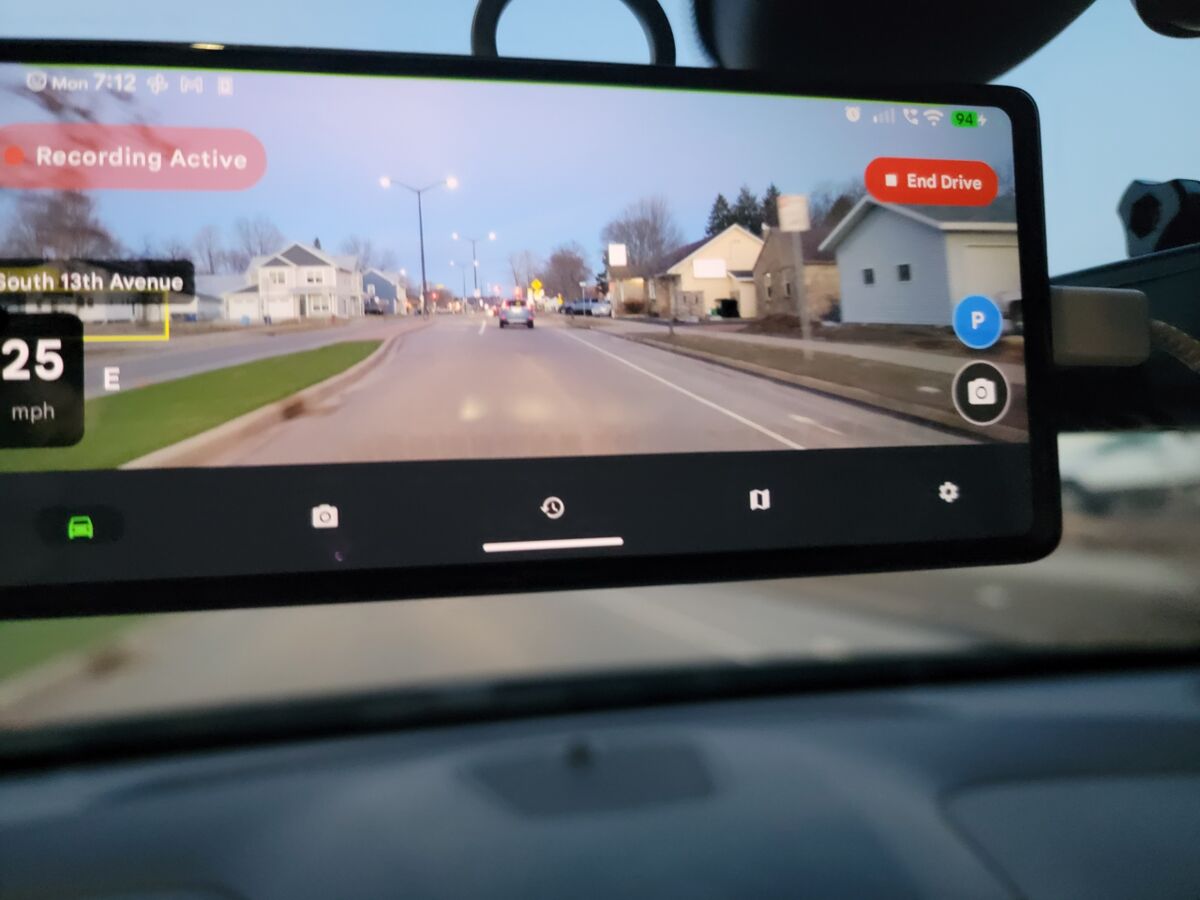
Open DriveSight and hit Start Drive. That's it — continuous recording starts automatically. Crash detection is on. Speed and GPS tracking are live. You're rolling.
Leave it in the car
When you park, tap "Park" to enable parking mode. The screen goes black, motion detection watches your car, and if anything happens it saves the clip automatically. Leave the phone in the car 24/7 — that's the whole point of using a spare phone.
If the spare phone lives in a pickup that sits in the sun, read the heat and power notes in our dash cam app guide for trucks first.
Why a Spare Phone Is the Best Dashcam Setup
Using a dedicated phone as your dashcam has real advantages over both hardware dashcams and using your everyday phone:
Costs Nothing
Your old phone is free. A $10 mount and a car charger you already have. Hardware dashcams start at $100-400.
24/7 Parking Mode
A dedicated phone stays in the car. Parking mode runs all day and night without draining the phone you actually use.
Cloud Backup Built In
DriveSight backs up important clips to your Google Drive automatically. Most hardware dashcams charge $10/month for cloud.
GPS + Cellular
Your old phone still has GPS for location tracking and speed. Connect to WiFi at home to sync clips to the cloud.
Camera & Police Alerts
DriveSight Pro alerts you to 336,000+ speed cameras, red light cameras, and police speed traps. No hardware dashcam does this.
Always Updated
Software updates add new features over time. Hardware dashcams are stuck with whatever they shipped with.
DriveSight vs Hardware Dashcams
| Feature | Old Phone + DriveSight | $200 Hardware Dashcam |
|---|---|---|
| Cost | $0 (phone you already own) | $100-$400 |
| Parking Mode | Included free | $50+ hardwire kit add-on |
| Cloud Backup | Free via Google Drive | $10/month subscription |
| Camera/Police Alerts | 336,000+ cameras | Not available |
| Crash Detection | Yes, auto-saves clip | Yes |
| Loop Recording | Yes | Yes |
| Monthly Fees | $0 forever | $0-$10/month for cloud |
| Software Updates | Regular updates | Rarely updated |
Which Old Phones Work?
Any Android phone running Android 8.0 (Oreo) or higher. That includes virtually every phone made after 2017. Here are some popular models that work great:
- Samsung Galaxy S8 and newer
- Samsung Galaxy A series (A50+)
- Google Pixel 2 and newer
- OnePlus 5T and newer
- LG G7 and newer
- Motorola Moto G6 and newer
- Xiaomi Mi 8 and newer
- Huawei P20 and newer
- Nokia 6.1 and newer
- Any budget phone from 2018+
For the best experience, we recommend a phone with at least 3GB of RAM and Android 10+. But even older phones with 2GB of RAM can handle basic recording and parking mode.
If you are still choosing an app rather than a phone, we ranked the options in the best free dash cam app for an Android phone.
Tips for the Best Setup
Keep it plugged in
A dedicated dashcam phone should always be connected to a car charger. DriveSight is designed for continuous use — it manages recording segments and storage automatically so the phone doesn't fill up.
Use a SIM card (optional)
If your old phone still has a SIM card or can connect to a mobile hotspot, DriveSight can sync clips to Google Drive in real-time. Without cellular, clips sync whenever the phone connects to WiFi (like when you park at home).
Enable auto-start on charger
DriveSight has an option to automatically start recording when the phone detects a charger. Plug in your car charger, start the engine, and recording begins automatically. No need to touch the phone.
Set up parking mode
Since the phone lives in your car, parking mode is the killer feature. Motion detection watches your car while you're away. If someone bumps your car, tries to break in, or even walks too close, DriveSight saves the clip and can flash the phone's light as a deterrent.
Fast USB-C Car Chargers for Dashcam Use
From $9.99Ready to try it?
Grab that old phone, install DriveSight, and you've got a dedicated dashcam in 60 seconds. Free to download, no account needed.
Download DriveSight FreeFrequently Asked Questions
Will an old phone overheat on the dashboard?
In moderate climates, most phones handle dashcam duty fine. On very hot days (95F+), the phone may warm up but DriveSight is designed to be lightweight on resources. If overheating is a concern, mount the phone behind your rearview mirror where it gets shade, or use a phone with good thermal management (Pixels and Samsung flagships tend to handle heat well).
Does the phone need a SIM card or data plan?
No. DriveSight works completely offline for recording, crash detection, and parking mode. GPS works without a SIM card on most phones. The only feature that needs internet is cloud backup to Google Drive — and that can sync over WiFi when you get home.
How much storage do I need?
DriveSight uses loop recording — it automatically deletes old footage to make room for new recordings. Even a phone with 16GB of storage works fine. Important clips (crashes, motion events, manual saves) are kept permanently until you delete them.
What about battery degradation on an old phone?
Since the phone is always plugged into a car charger, battery health isn't a concern for recording. Parking mode does use battery when the car is off, but a phone with even 50% battery health will last several hours in parking mode. For all-night parking surveillance, consider a USB battery bank.