Best Dash Cam App with Android Auto Support (2026)
Most dashcam apps are confined to your phone screen. You mount the phone on your windshield, and you never look at it again until something goes wrong. DriveSight takes a different approach. It works directly with Android Auto, putting your dashcam controls, speed readout, recording status, and police alerts on your car's built-in infotainment display.
That means you get a full dashcam control panel on a 7-inch, 8-inch, or 10-inch car screen without buying any dedicated hardware. No separate dashcam unit. No extra wiring. Just your phone plugged into your car the same way you already use Android Auto for Google Maps and Spotify. The phone handles recording while the head unit gives you a dashboard to monitor and control everything.
DriveSight on a Chevrolet's Android Auto display: speed, recording status, Police Map button, and Start Trip control
How a Dash Cam App Works on Android Auto
Android Auto lets specific app interfaces run on your car's head unit. DriveSight is built to take advantage of this. When you connect your phone via USB or wireless Android Auto, the dashcam control panel appears on your car's screen alongside your other Android Auto apps.
Here is what you see on the car's display:
- Recording status — A clear indicator showing whether recording is active or stopped, with a Start Trip button to begin
- Current speed — GPS-based speedometer in mph or km/h, independent of your car's speedometer
- Compass heading — Your current direction of travel (N, S, E, W)
- Police Map — A dedicated button to scan for police activity and speed traps nearby
- Alert notifications — Speed camera, police, and enforcement alerts appear on the head unit as you approach them
The phone does all the heavy lifting. It runs the camera, processes video, writes files to storage, and handles crash detection. The phone screen shows the live camera feed while the Android Auto display gives you a clean control panel for managing the dashcam and viewing alerts. Recording continues in the background regardless of what the head unit is showing, even if you switch to Google Maps or Spotify.
Why Android Auto Changes How You Use a Dashcam App
A phone mounted on the windshield has a small screen that is hard to glance at while driving. Your car's infotainment screen is designed to be read at a glance. It is positioned in your natural line of sight, at a size that makes text and status indicators immediately legible. That difference matters when you want to verify that your dashcam is actually recording, check your current speed, or see an incoming police alert without taking your eyes off the road for more than a second.
The phone screen still shows the live camera feed, so you get both: a windshield-mounted phone recording the road with a live preview, and a head unit dashboard showing your speed, alerts, and recording controls in a format designed for in-car use.
Bigger Controls
Start and stop recording, check police alerts, and monitor speed on your car's 7-10 inch screen. No squinting at a phone display.
Better Position
The head unit sits in your natural eye line. Glance at your dashcam status without looking up at the windshield mount.
No Extra Hardware
Your phone connects via USB or wireless Android Auto. Same cable you already use for charging and music. Zero additional equipment.
Background Recording
Switch to Google Maps or Spotify on the head unit and the dashcam continues recording on the phone. It never stops capturing footage.
Police Map on Android Auto
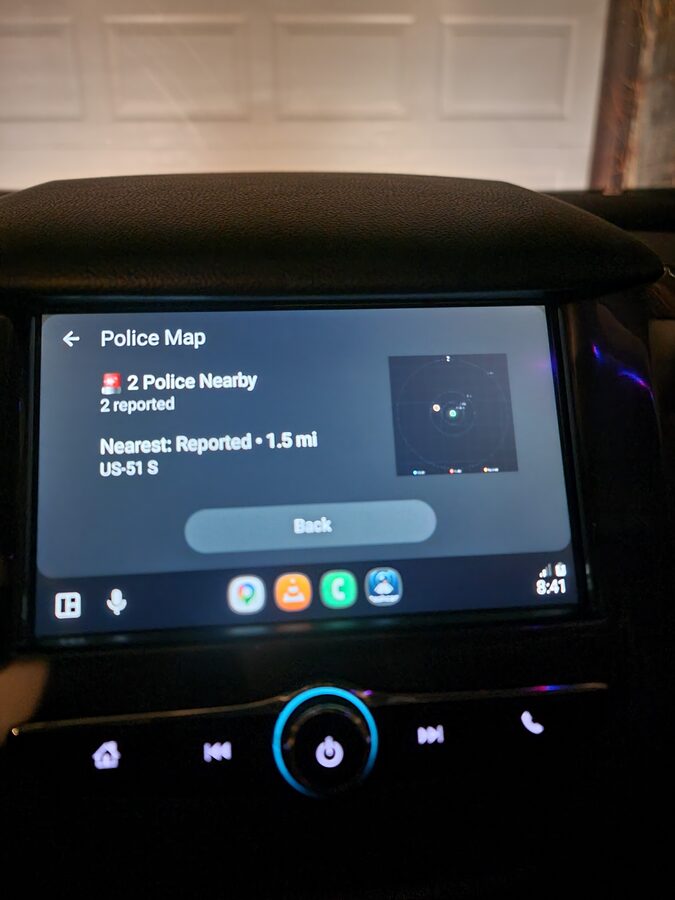
DriveSight Pro includes a Police Map feature that is accessible directly from the Android Auto interface. Tap the Police Map button on your car's screen and the app scans for reported police activity within a configurable radius around your current location.
Police Map on Android Auto detecting 2 reported officers within range, showing distance and road name on a Chevrolet infotainment display
The Police Map screen shows:
- Police count — Number of reported officers within your scan radius
- Distance and road name — How far away the nearest reported officer is and what road they are on
- Radar display — A visual radar showing the direction and approximate position of reports relative to you
- Scan radius — Configurable from 1 to 10 miles
When the area is clear, the screen shows a green status confirming no police detected within your scan radius. This is not a radar detector. It uses crowd-sourced reports and historically verified enforcement locations from DriveSight's database of over 336,000 camera and alert points.
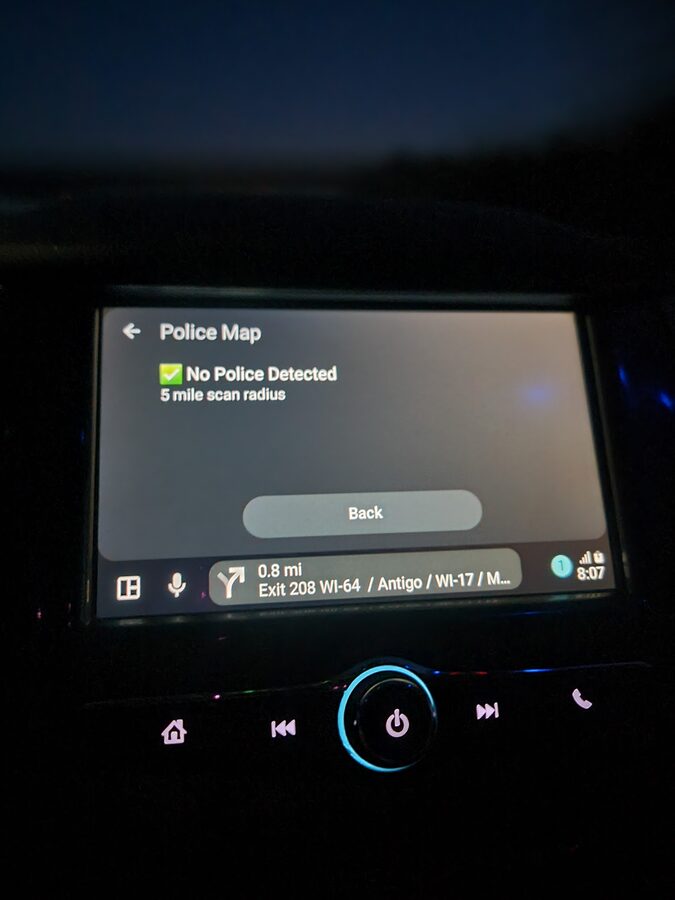
All clear: no police detected within the 5-mile scan radius
Which Cars Support Android Auto Dashcam Apps?
Any vehicle with Android Auto support works. That covers most cars made from 2016 onward. Here is a partial list of manufacturers with Android Auto built into their infotainment systems:
- Chevrolet — Equinox, Malibu, Silverado, Tahoe, Traverse, Colorado, Camaro, Blazer
- Ford — F-150, Escape, Explorer, Maverick, Bronco, Mustang
- Toyota — Camry, Corolla, RAV4, Tacoma, Highlander, Tundra (2020+)
- Honda — Civic, Accord, CR-V, Pilot, HR-V
- Hyundai — Elantra, Tucson, Sonata, Palisade, Santa Fe
- Kia — Forte, K5, Sportage, Telluride, Seltos
- Volkswagen — Jetta, Tiguan, Atlas, Taos, ID.4
- Subaru — Outback, Forester, Crosstrek, Impreza, WRX
- Nissan — Altima, Rogue, Sentra, Pathfinder, Frontier
- BMW, Mercedes, Audi — Most models from 2019 onward
If your car did not come with Android Auto, aftermarket head units from Pioneer, Kenwood, Sony, and Alpine add Android Auto support to almost any vehicle for $200-500. That is still less than most dedicated hardware dashcam setups with comparable features.
Android Auto Dashcam vs Dedicated Hardware Dashcam
A dedicated hardware dashcam like a Viofo, Garmin, or Thinkware has one screen: a tiny 1.5 to 3 inch LCD on the unit itself, usually hidden behind your rearview mirror. You interact with it through small buttons or a cramped touchscreen. Many drivers install hardware dashcams and never look at them again because the interface is not worth engaging with while driving.
A dashcam app running on Android Auto gives you a full-size interface on the screen you already look at. The comparison is not close:
| Feature | DriveSight on Android Auto | Hardware Dashcam |
|---|---|---|
| Control Interface | 7-10" car screen + phone | 1.5-3" built-in LCD |
| Police Alerts | 336,000+ locations on car display | Not available |
| Speed + Alerts Display | Large, readable on head unit | Small overlay or none |
| Setup Required | Plug in phone, tap start | Hardwire kit, adhesive mount, cable routing |
| Cloud Backup | Google Drive, free | $5-15/month subscription |
| Upfront Cost | $0 (use existing phone) | $200-400+ |
| AI Detection | YOLOv8 on-device | Basic or none |
| Software Updates | Play Store updates | Rare firmware patches |
How to Set Up DriveSight on Android Auto
Setup takes about two minutes. Here is the process:
- Install DriveSight from Google Play. Grant camera, microphone, and location permissions.
- Connect your phone to your car via USB cable or wireless Android Auto. The phone should already be paired with your car's infotainment system.
- Open DriveSight from the Android Auto app launcher on your car's screen.
- Tap Start Trip and recording begins immediately. Speed, heading, recording status, and police alerts appear on the car's display. The live camera feed runs on the phone screen.
Mount the phone on your windshield with the rear camera facing forward. The phone handles all recording. The car's screen is your monitoring interface. If you switch to Google Maps or any other app on the head unit, the dashcam continues recording in the background on the phone.
For automatic recording, enable auto-start on charger in the app settings. The dashcam starts recording the moment your phone connects to your car's USB port, with zero interaction required.
Frequently Asked Questions
Can you use a dashcam app on Android Auto?
Yes. DriveSight has full Android Auto support. Recording status, speed, police alerts, and dashcam controls all display on your car's head unit. The live camera feed stays on the phone screen. Recording runs on the phone itself, so video quality and storage are handled by the phone regardless of what is shown on the car's screen.
Does the dashcam still record when using Android Auto?
Yes. Recording is a phone-side process that runs independently of what the head unit is showing. You can switch to Google Maps, Spotify, or any other app on the Android Auto display and the phone keeps recording the entire time.
Can I see police alerts on my car's screen?
Yes. DriveSight Pro includes a Police Map accessible through Android Auto. It shows reported police activity, distance to the nearest report, the road name, and a radar-style visual display. The scan radius is configurable from 1 to 10 miles.
Does Android Auto dashcam work wirelessly?
Yes, if your car supports wireless Android Auto. Speed, alerts, and recording controls all work over the wireless connection. However, a wired USB connection is recommended for the most stable experience and to keep the phone charged during recording.
What about Apple CarPlay?
DriveSight is an Android app. It works with Android Auto only. CarPlay is Apple's system for iPhones and is not compatible with Android applications.
Control your dashcam from your car's screen
DriveSight with Android Auto support. Police alerts, speed monitoring, and full recording controls on your car's built-in display. Free download, no hardware needed.
Download DriveSight Free